> For the complete documentation index, see [llms.txt](https://yuelan-icus-organization.gitbook.io/zhi-sheng-ji/llms.txt). Markdown versions of documentation pages are available by appending `.md` to page URLs; this page is available as [Markdown](https://yuelan-icus-organization.gitbook.io/zhi-sheng-ji/gao-ji-pei-zhi/ekf-kuo-zhan-ka-er-manlbo.md).
# EKF(扩展卡尔曼滤波)
## 扩展卡尔曼滤波 (EKF)[¶](https://ardupilot.org/copter/docs/common-apm-navigation-extended-kalman-filter-overview.html#extended-kalman-filter-ekf)
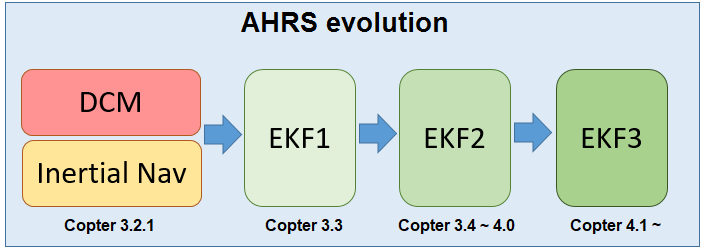
扩展卡尔曼滤波(EKF)算法用于 根据以下条件估计车辆位置、速度和角度方向 速率陀螺仪、加速度计、指南针、GPS、空速和气压 压力测量。
EKF 相对于更简单的互补滤波器的优势 算法(即“惯性导航”)是,通过融合所有可用的测量值会更好 能够拒绝有明显误差的测量。这使得 车辆不易受到影响单个传感器的故障的影响。一个 EKF 也 支持从可选传感器进行测量,例如光流和 用于辅助导航的激光测距仪。
当前稳定版本的ArduPilot使用EKF3作为其主要姿态和位置估计源,DCM在后台安静运行。 如果自动驾驶仪有两个(或更多)IMU可用,则两个EKF“内核”(即EKF的两个实例)将并行运行,每个内核使用不同的IMU。 在任何时候,只使用单个 EKF 内核的输出,该内核是报告最佳运行状况的内核,这取决于其传感器数据的一致性。
大多数用户应该不需要修改任何 EKF 参数,但以下信息提供了有关最常更改的参数的一些信息。 更详细的信息可以在[开发者 EKF wiki 页面上](https://ardupilot.org/dev/docs/extended-kalman-filter.html#extended-kalman-filter)找到。
### 应该使用 EKF2 还是 EKF3?[¶](https://ardupilot.org/copter/docs/common-apm-navigation-extended-kalman-filter-overview.html#should-the-ekf2-or-ekf3-be-used)
通常,我们建议用户坚持使用 EKF3,现在是默认设置。此外,由于空间限制,1MB自动驾驶仪只有此选项。EKF2 仍然可以使用,但没有 EKF3 的许多增强功能,例如更新的传感器源,包括信标、车轮编码器和视觉里程计。
### 选择 EKF 和内核数量[¶](https://ardupilot.org/copter/docs/common-apm-navigation-extended-kalman-filter-overview.html#choosing-the-ekf-and-number-of-cores)
[AHRS\_EKF\_USE](https://ardupilot.org/dev/docs/extended-kalman-filter.html#extended-kalman-filter-ahrs-ekf-use):设置为“1”以使用EKF,“0”设置为使用DCM进行姿态控制和 用于位置控制的惯性导航(Copter-3.2.1)或AHRS航位推算(飞机)。在 Copter-3.3(及更高版本)中,此参数强制为“1”且无法更改。
[AHRS\_EKF\_TYPE](https://ardupilot.org/copter/docs/parameters.html#ahrs-ekf-type):设置为 “2” 使用 EKF2 进行姿态和位置估计,设置为 “3” 表示 EKF3。
[EK2\_ENABLE](https://ardupilot.org/copter/docs/parameters.html#ek2-enable),[EK3\_ENABLE](https://ardupilot.org/copter/docs/parameters.html#ek3-enable):设置为“1”以分别启用 EKF2 和/或 EKF3。
[EK2\_IMU\_MASK](https://ardupilot.org/copter/docs/parameters.html#ek2-imu-mask),[EK3\_IMU\_MASK](https://ardupilot.org/copter/docs/parameters.html#ek3-imu-mask):指定要使用的 IMU(即加速度计/陀螺仪)的位掩码。将为指定的每个 IMU 启动一个 EKF“核心”(即单个 EKF 实例)。
* 1:使用第一个 IMU 启动单个 EKF 内核
* 2:仅使用第二个 IMU 启动单个 EKF 内核
* 3:分别使用第一个和第二个 IMU 启动两个单独的 EKF 内核
[EK3\_PRIMARY](https://ardupilot.org/copter/docs/parameters.html#ek3-primary):选择使用哪个“核心”或“通道”作为主。值 0 选择[EK3\_IMU\_MASK](https://ardupilot.org/copter/docs/parameters.html#ek3-imu-mask)中的第一个 IMU 通道,1 选择第二个通道,依此类推。确保所选主通道存在。请参阅下面的亲和力和通道切换。
注意
如果 EKF 变得不健康或 EKF 没有融合 GPS 数据,尽管 GPS 具有 2D 锁定,飞机和漫游车将从 EKF3 或 EKF3 回退到 DCM。 没有从 EKF3 到 EKF2(或 EKF2 到 EKF1)的回退
警告
使用上述参数可以同时并行运行多达 5 个 AHRS(DCMx1、EKF2x2、EKF3x2),但这可能会导致性能问题,因此如果并行运行 EKF2 和 EKF3,请设置IMU\_MASK以减少内核总数。
### 亲和力和通道切换[¶](https://ardupilot.org/copter/docs/common-apm-navigation-extended-kalman-filter-overview.html#affinity-and-lane-switching)
EKF3 提供了传感器亲和力功能,允许 EKF 内核也使用传感器的非主要实例,特别是空速、气压计、指南针(磁力计)和 GPS。这使得车辆能够更好地管理高质量的传感器,并能够相应地切换车道,以使用性能最佳的传感器进行状态估计。有关更多详细信息和配置,请参阅 [EKF3 关联和通道切换](https://ardupilot.org/copter/docs/common-ek3-affinity-lane-switching.html#common-ek3-affinity-lane-switching)。
### 全球定位系统/非全球定位系统转换[¶](https://ardupilot.org/copter/docs/common-apm-navigation-extended-kalman-filter-overview.html#gps-non-gps-transitions)
EKF3(在ArduPilot 4.1及更高版本中)支持传感器的飞行切换,这对于在GPS和非GPS环境之间转换非常有用。有关更多详细信息,请参阅 [GPS/非 GPS 过渡](https://ardupilot.org/copter/docs/common-non-gps-to-gps.html#common-non-gps-to-gps)。
### 经常修改的参数[¶](https://ardupilot.org/copter/docs/common-apm-navigation-extended-kalman-filter-overview.html#commonly-modified-parameters)
[EK2\_ALT\_SOURCE](https://ardupilot.org/copter/docs/parameters.html#ek2-alt-source)将哪个传感器用作主要高度源
* 0:使用气压计(默认)
* 1:使用测距仪。**除非飞行器在地面平坦的室内飞行,否则请勿使用此选项**。有关地形跟踪,请参阅[直升机](https://ardupilot.org/copter/docs/terrain-following.html#terrain-following)和[飞机特定地形遵循说明](https://ardupilot.org/plane/docs/common-terrain-following.html#common-terrain-following),不需要更改此参数。
* 2 : 使用全球定位系统。当 GPS 质量非常好且气压计漂移可能是一个问题时很有用。例如,如果车辆将在高度变化为 >100m 的情况下执行长途任务。
[EK2\_ALT\_M\_NSE](https://ardupilot.org/dev/docs/extended-kalman-filter.html#extended-kalman-filter-ekf-alt-noise):默认值为“1.0”。较低的数字减少了对加速度计的依赖,增加了对气压计的依赖。
[EK2\_GPS\_TYPE](https://ardupilot.org/dev/docs/extended-kalman-filter.html#extended-kalman-filter-ekf-gps-type): 控制 GPS 的使用方式。
* 0:从GPS使用3D速度和2D位置
* 1:使用2D速度和2D位置(GPS速度没有贡献) 到海拔估计)
* 2:使用2D位置
* 3:没有GPS(仅在可用时才使用[光流](https://ardupilot.org/copter/docs/common-optical-flow-sensors-landingpage.html#common-optical-flow-sensors-landingpage))
[EK2\_YAW\_M\_NSE](https://ardupilot.org/copter/docs/parameters.html#ek2-yaw-m-nse):在计算航向时控制 GPS 和指南针之间的权重。默认值为“0.5”,较低的值将导致指南针更受信任(即指南针的权重越高)
如上所述,有关 EKF 理论和调谐参数的更详细概述,请参阅开发人员 wiki 的[扩展卡尔曼滤波器导航概述和调谐](https://ardupilot.org/dev/docs/extended-kalman-filter.html#extended-kalman-filter)。
[以前](https://ardupilot.org/copter/docs/common-uavcan-gui.html)[下一个](https://ardupilot.org/copter/docs/common-ek3-affinity-lane-switching.html)
---
# Agent Instructions
This documentation is published with GitBook. GitBook is the documentation platform designed so that both humans and AI agents can read, navigate, and reason over technical content effectively. Learn more at gitbook.com.
## Querying This Documentation
If you need additional information that is not directly available in this page, you can query the documentation dynamically by asking a question.
Perform an HTTP GET request on the current page URL with the `ask` query parameter:
```
GET https://yuelan-icus-organization.gitbook.io/zhi-sheng-ji/gao-ji-pei-zhi/ekf-kuo-zhan-ka-er-manlbo.md?ask=
```
The question should be specific, self-contained, and written in natural language.
The response will contain a direct answer to the question and relevant excerpts and sources from the documentation.
Use this mechanism when the answer is not explicitly present in the current page, you need clarification or additional context, or you want to retrieve related documentation sections.